

Written by James BrittTechnically reviewed by Jim Freeze · Reviewed
The Ruby cannot modify frozen array error occurs when an operation tries to change an array after it has been frozen. Either return a new array or create a mutable duplicate that you can edit. If the modification must affect the original array, first determine why its owner froze it.
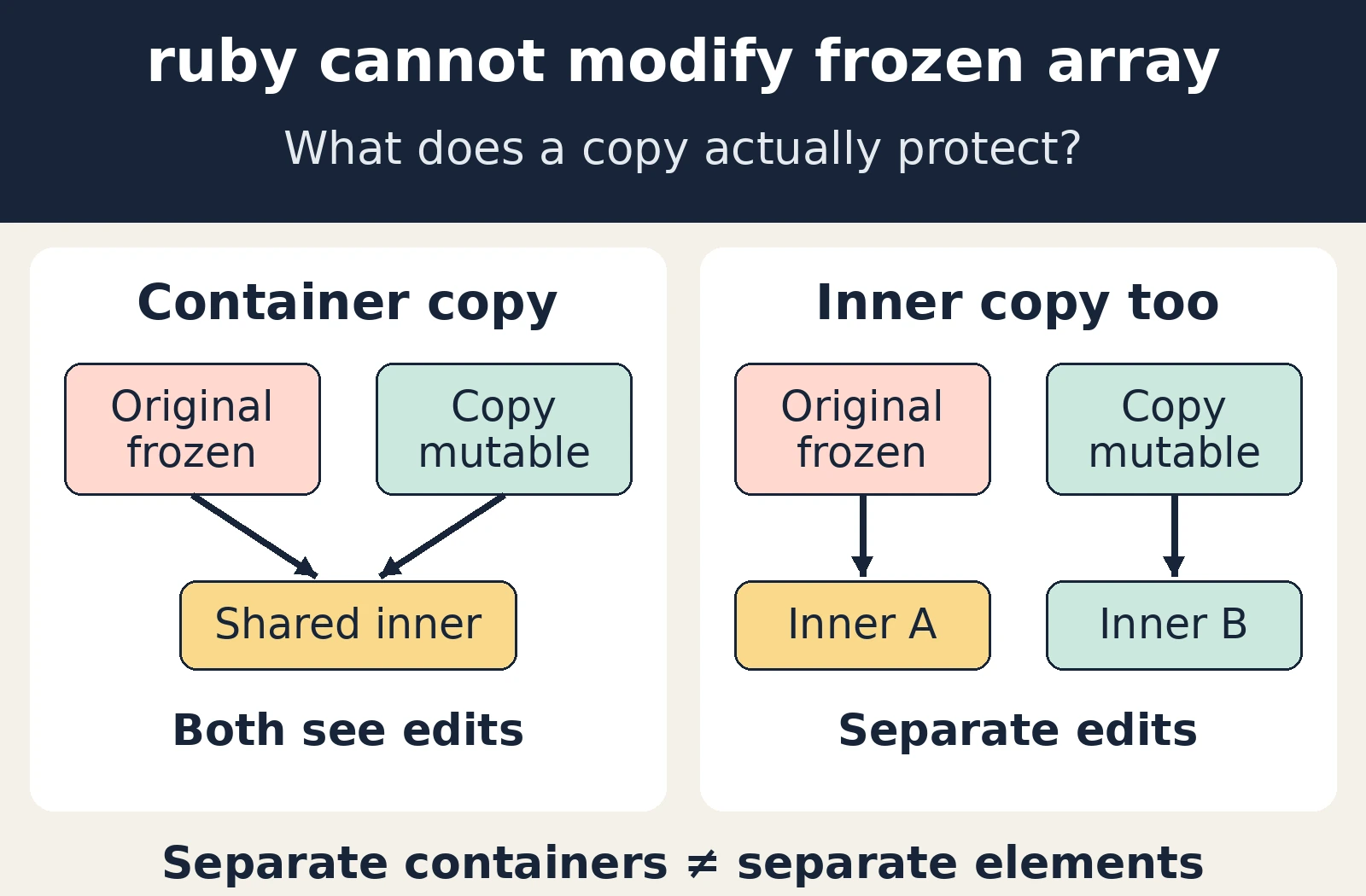
Creating a duplicate array can help solve many problems but not all problems. Creating a duplicate of an array produces a new container, however its members can still be referencing the exact same objects. This distinction becomes important because the objects being referenced could be strings, hashes or other arrays. This guide distinguishes between modifying a collection and modifying the individual objects within that collection.
Find the array that rejected the change
First look at the exception class and backtrace. Attempting to modify a frozen array normally raises FrozenError. The first application frame can indicate where your code attempted the change. However, that location may differ from where the array was frozen. Follow the value back to its source before choosing a repair.
For instance, a shared list of supported export formats may be frozen to prevent one request from changing later requests. Adding a temporary format directly to that list contradicts its purpose. A local copy is appropriate if the additional format belongs only to this request. Removing the freeze would change the contract for every caller.
As demonstrated in the first example, attempting to append to a frozen array results in an exception and leaves the original two-element array unchanged. The example displays the exception. In production code, you generally do not want to handle exceptions by pretending something happened that did not happen. Instead, you should attempt to prevent such failures in the first place.
formats = [:csv, :json].freeze
begin
  formats << :xml
rescue FrozenError => error
  puts error.class
end
p formats
FrozenError
[:csv, :json]
Ruby cannot modify frozen array: choose by intent
To fix a Ruby cannot modify frozen array failure, consider what the next statement needs. Does it need a sorted result, a filtered result or a collection that grows incrementally? A transformation can return a new array. A builder, on the other hand, may need a mutable container. Both approaches can protect the original collection.
Consult Ruby-Doc Array reference to confirm whether a particular operation modifies its receiver. Many bang methods have non-mutating counterparts but naming convention does not define mutability: for example, both appending and assigning to an index can modify without an exclamation point. As opposed to merely examining its name to ensure safety, verify the actual operation performed.
The sorting example returns a new ordered array while maintaining the original order in the frozen input. Keep the returned value. Calling a non-mutating method and ignoring its result does not update the input. This mistake can slip into a repair when an in-place call is replaced without updating the next statement.
input = [3, 1, 2].freeze
result = input.sort
p result
p input
[1, 2, 3]
[3, 1, 2]
Ruby cannot modify frozen array: make a working copy
For an ordinary Array, duplication creates a shallow copy without preserving the original container’s frozen state. You can append to this duplicate while leaving the original array’s membership intact. Give the working copy its own variable so that the ownership decision is apparent where the value enters your method.
The example working copy adds a format exclusively to the request’s list. It also examines object identity rather than merely comparing contents. Two arrays can contain identical elements yet represent completely unrelated containers. Additionally, assigning an array to another variable does not produce a copy: both identifiers can simultaneously refer to the exact same frozen object.
Cloning works differently. For ordinary Arrays, a default clone preserves the frozen status of the cloned item, thus switching from duplicating to cloning will likely restore the FrozenError. Similarly, simply converting an ordinary array to an array is not sufficient to provide independent-copy guarantees. Select the explicit operations that match your intended ownership contract rather than experimenting with conversion techniques until one succeeds.
There is no ordinary unfreeze operation for the original array. If your code needs a mutable result, create one. However, silently returning a copy may break an interface that promises to modify its input in place. Update the contract and callers together, or clearly reject frozen input when mutation is required.
formats = [:csv, :json].freeze
working = formats.dup
working << :xml
p formats
p working
p [working.frozen?, working.equal?(formats)]
[:csv, :json]
[:csv, :json, :xml]
[false, false]
The shallow-copy trap
Freezing an array prevents changes to its structure; it does not automatically freeze its elements. An inner array can remain mutable even if the outer array is frozen. Therefore, freezing the outer array alone does not make the entire nested data structure immutable. Inspect the particular object that receives each change.
Next, duplicate the outer array. The two containers are distinct, but they share references to the same inner array. Changing that inner array affects what both containers observe. Neither outer container gains or loses a slot. The shared inner object changes, so the outer array’s frozen protection has not been violated.
For a known data shape, copying the parts you intend to change can be clearer than adding a universal copying helper. A list of rows can be rebuilt with a new row array for each input row. However, if those rows contain mutable objects, another layer of sharing remains. Document the supported shape explicitly.
Active Support provides a deep duplication extension for supported nested collections. The Rails guide explains how shallow duplication leaves elements shared. This extension is not a core Ruby Array method. Check its behavior for your application’s object types; the examples here do not execute Rails or test arbitrary object graphs.
Predict the nested-array result
Read the exercise before opening the answer. The outer array is frozen and then duplicated. An append targets the first inner array through the duplicate. Will Ruby raise an exception, change only the duplicate’s nested value, or expose the change through both containers? Trace the receiver of the append, then choose your answer.
original = [[:csv]].freeze
working = original.dup
working.first << :json
p original
p working
p original.first.equal?(working.first)
Reveal the result and explanation
Both outer containers show the added value, and the identity check for their first elements returns true. The append targets the shared, mutable inner array. It does not append to either outer array. The follow-up example copies the inner row as well, so its change leaves the original row unchanged.
[[:csv, :json]]
[[:csv, :json]]
true
original = [[:csv]].freeze
working = original.map(&:dup)
working.first << :json
p original
p working
p original.first.equal?(working.first)
[[:csv]]
[[:csv, :json]]
false
This exercise also explains a misleading test result. Checking that the outer arrays differ is insufficient when the function changes nested data. Check the mutable element itself. A test can pass an outer identity assertion while still allowing a caller’s nested data to change through a shared reference.
Trace unexpected freezing to its source
If a previously working path starts raising, inspect recent changes to constants, configuration builders and library boundaries. A dependency may now return a protected collection. A style correction may have added a freeze. Neither condition proves the freeze is wrong. Identify the array’s intended lifetime and whether consumers should treat it as shared data.
RuboCop’s mutable-constant rule provides a concrete example. Its documentation describes freezing mutable literals assigned to constants and marks autocorrection as unsafe. Inspect such corrections against the consumers of those constants. A constant name alone does not make an array immutable; adding a freeze can expose mutations that were already changing shared state.
The frozen string literal comment concerns string literals; it does not automatically freeze every array in a file. Do not remove it as a generic frozen-array fix. Also avoid blanket rescue blocks around a whole request. They can obscure an ownership error without producing the collection that the caller expected.
Test your Ruby cannot modify frozen array repair
If your method accepts both frozen and unfrozen inputs, test both. Assert the returned contents, then verify that the caller’s input retains its expected contents. For nested data, check the mutable descendants the method promises to preserve. Also include an empty array: a repair should not rely on an existing first element.
The five examples were executed with output assertions in the official Ruby 4.0.0 WASI runtime. Additional assertions cover cloning, conversion and empty or populated inputs. These checks establish the displayed core Array behavior. They do not establish Rails behavior, native-gem compatibility or deployment behavior. Repeat ownership tests in your application’s runtime and dependency environment.
Takeaway
Fix a Ruby cannot modify frozen array failure by establishing who owns the change. Return a new result for a transformation, or duplicate the container for local structural edits. Check nested sharing separately. Keep the freeze when it protects shared input, and define the intended copy boundary in code and tests.